"I would like to copy blu ray disc to hard drive without losing the quality, menus, and sound. Is there any software I can use?"
To copy Blu ray to hard drive, what I recommend you is Leawo Blu ray Copy, a professional and easy to use program for copying Blu ray to hard drive, Blu ray to Blu ray disc, Blu ray folder or DVD disc and DVD folder. In addition to its powerful copying function, it also allows users to select copy mode from full, main and custom, add subtitle and preview the source video, etc. In the following post, you will get the detailed steps on how to copy Blu ray to hard drive with Leawo Blu ray Copy.
Get Leawo Blu ray Copy Coupon Code
Get more Leawo Coupon Codes
How to copy Blu ray to hard drive?
1. Download and install Blu ray Copy. Then insert Blu ray disc to BD drive and run Blu ray Copy.
2. Click “Source” to import Blu ray source from Blu ray dsic to the program.
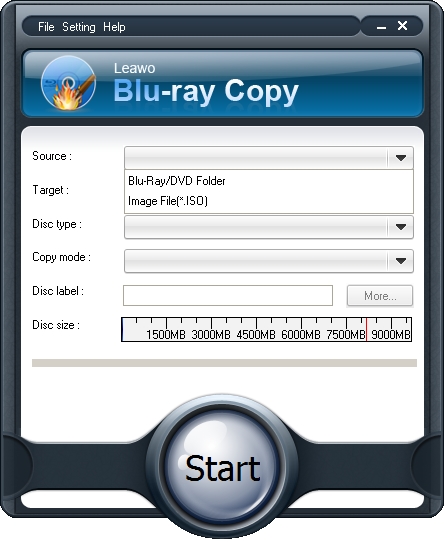
3. Click “Target” drop-down bottom to set target destination to save output Blu ray on hard drive.

4. Choose Copy Mode from Full Movie, Main Movie and Custom; set Disc Label. When you choose Main Movie or Custom Movie copy mode, you are able to make a preview of source Blu-ray files and select audio and subtitle of source Blu-ray files.
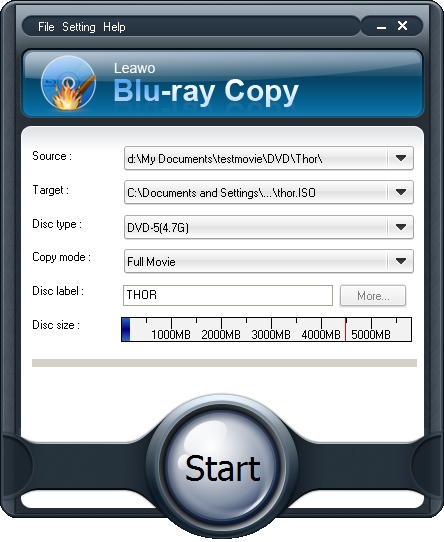
5. Click “Start” button to start copying Blu ray to hard drive.
